

Data Sources
ReportShell supports pluggable data sources for filling reports and populating input control options via JasperReports Library APIs.
A report dataset or input control may define a data source path string that identifies a registered data source on the server.
How it Works
Section titled “How it Works”When filling a report or loading input control options, ReportShell resolves a data source service that can contribute parameters such as report connections. ReportShell uses JasperReports Library’s parameter contributor concept for both reports and input controls. This provides a unified approach for providing and disposing data source resources.
Resolution Strategies
Section titled “Resolution Strategies”ReportShell comes with default strategies for resolving data sources:
- Path-Based Resolution: Resolves a data source based on a path/URI string defined in the JRXML template for a report
DataSetor an input control. - Fallback Resolution: Attempts to resolve a default data source if none was explicitly specified in the report.
These strategies are implemented as ParameterContributorFactory beans. You can register your own contributor factory beans for custom
data source resolution logic.
Default Behavior
Section titled “Default Behavior”- If a data source path is provided in the dataset (via Report Unit DataSource Path property) or control properties (via DataSource property), ReportShell treats the path as the bean name of a data source bean registered in your Spring application context.
- If no data source is specified and the query is a
SQLquery, it checks for a primaryjavax.sql.DataSourcebean. This allows standard SQL queries to work out-of-the-box in most Spring Boot applications using the main application database.
This default behavior lets you simply register a bean of type javax.sql.DataSource for SQL queries with a custom bean name e.g. my-custom-data-source and reference that bean from your reports by its bean name.
For more complex scenarios, you can register one or more ReportDataSourceFactory beans. Such beans are tried in order to get a non-null parameter contributor instance for a specific data source path.
Configuring Report Data Source Paths
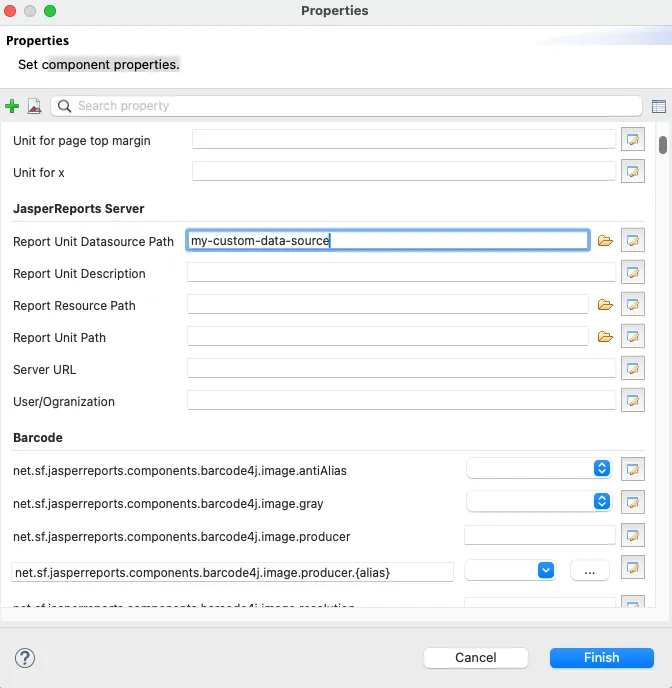
Section titled “Configuring Report Data Source Paths”ReportShell uses the same settings and properties as JasperReports Server to simplify the mental model. This applies to data source paths as well. To configure a report data source path in JasperSoft Studio:
- Select a DataSet or the main report for the report dataset
- Open Misc in the properties pane
- Click Edit Properties
- Find
Report Unit Datasource Pathunder the JasperReports Server section and enter your data source name or path
Input Control Data Sources
Section titled “Input Control Data Sources”ReportShell uses the same data source resolution logic for both reports and input controls. This allows you to use the same data source for both or configure different data sources for each through a consistent API.
ReportShell ensures that any data source used for executing a control query is properly closed and disposed of after the control has been populated.
See Input Controls for how to set control data sources.
© 2026 Bivektor Inc. All rights reserved. ReportShell™
is a trademark of Bivektor, Inc.
Questions? Email us at reportshell@bivektor.com.
JasperReports® and Jaspersoft® are trademarks of Cloud Software Group, Inc. and/or its subsidiaries. Eclipse BIRT™ and BIRT™ are trademarks of the Eclipse Foundation. Spring® is a trademark of Broadcom Inc. and/or its subsidiaries. React is a trademark of Meta Platforms, Inc. ReportShell and Bivektor, Inc. are not affiliated with, endorsed by, sponsored by or otherwise associated with the owners of the JasperReports®, Jaspersoft®, Spring®, Eclipse BIRT™, BIRT™ or React marks. Any reference to these or other trademarks on this site is made solely for informational, descriptive, comparative and interoperability purposes.