Seamless JasperReports integration for Spring web apps

ReportShell™ is a production-ready web integration layer for Spring Boot applications that use JasperReports Library for reporting. One starter adds built-in REST APIs plus a modern frontend viewer for serving your reports on the web.

Features

REST APIs Your Frontend Needs

/controls

Fetch input control metadata: single vs multi-valued, entry vs choice, UI data type (Text, Number, Date, etc.), and any cascading dependencies.

/control-states

Fetch initial control states including default values and option lists, re-evaluate dependent controls on control changes.

/render

Render HTML previews or export to PDF, XLSX, CSV, and DOCX; any format supported by JasperReports® exporters or your own custom exporters.

/executions

Execute and save the output JasperPrint once, render to multiple formats without the need for filling the report again. Plug-in your persistent storage if needed.

SQL-Aware Design

Automatic control dependency inference

$X{IN, ...} and $P{...} substitutions in input control queries are analyzed using the JasperReports Library's query parser. Dependencies are inferred from the query criteria, so you don't hard-code them.

Auto-Connect the default Spring JDBC DataSource

The primary Spring JDBC DataSource is auto-connected to both reports and input controls unless they explicitly refer to a named data source. Single data source apps need no glue code. ReportShell manages the connection lifecycle for both through JasperReports Library's extension points.

Multi-Select Query Control
SELECT id, name FROM cities
WHERE $X{IN, country_id, country}
  AND region_id = $P{region}
ORDER BY name
Control Metadata
{
  "parameter": "city",
  "dataType": "Number",
  "choice": true,
  "multi": true,
  "dependsOn": ["country", "region"]
}

Frontend Viewer

A ready-to-use React-based JavaScript web report viewer

Rich input controls

Built on React and MUI . Date pickers, single-select and multi-select lists, cascading controls, plus a "select all" option that bypasses filtering.

Multi-language

Includes bundled translations for various languages. Selects the best matching translation from the Java locale you pass to it on initialization.

Configurable

Configure locale, time zone and allowed export formats.

Built-in HTML zoom levels

Predefined zoom sizes for HTML previews. Users pick the one that fits their screen.

Preview and export

Preview as HTML and export to any available format. Extra export settings cover pagination skipping, horizontal and vertical offsets, plus a "one sheet per page" toggle for Excel.

Simple to import and mount

Import the viewer module, set up global configuration, then mount the viewer component on whichever DOM element you choose.
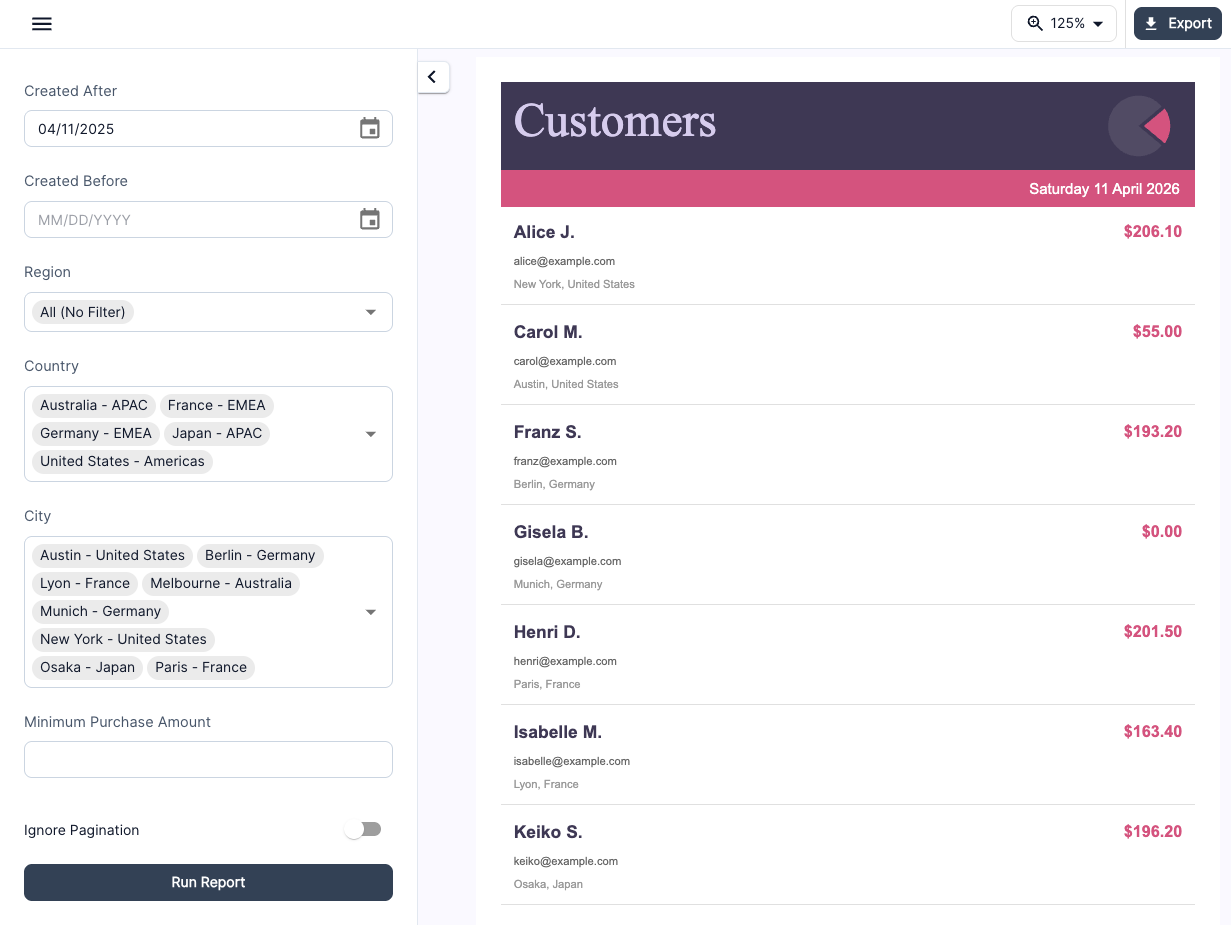
ReportShell React viewer showing a customers report with cascading Region, Country and City filters
Need the source code?

See details on our pricing page.

Pricing

Developer


Free

For local development and evaluation

  • Free to use for local development and evaluation
  • Core features to evaluate common reporting needs
  • Not licensed for non-development use

Basic


$549 USD

1 dev, 1 application

  • 1 developer seat
  • 1 application for your organization or a single customer
  • Perpetual - no annual fees
  • 12 months of Standard Support, up to 4 requests

Compare all features

Professional


$1299 USD

Unlimited devs, 3 applications

  • Unlimited developer seats
  • 3 applications for your organization or up to 3 customers
  • Perpetual - no annual fees
  • 12 months of Standard Support, up to 8 requests

Compare all features

See full feature comparison including SaaS and OEM licensing, plus support plans.

FAQ

ReportShell™ is a lightweight embedded reporting framework for integrating JasperReports® into Spring Boot web applications. It parses report metadata to build dynamic parameter forms, runs reports (and optionally persists the print output), and exports to any format that the JasperReports® Library supports.

It ships as Spring components you can integrate through a starter and then customize for your needs. The package includes built-in reporting REST APIs for interacting with your reports, plus a ready-to-use React viewer built on top of those same APIs.

ReportShell started as the integration layer we built for our own product. We turned it into a reusable library after running into the same requirements on other applications. The longer version is on the story behind ReportShell page.

See the documentation for more details.
No. ReportShell is a set of Spring components and configurations for embedding reporting directly into your own Spring applications.

Features that JasperReports Server provides, like a built-in repository, scheduling, user management or ad-hoc report design, are out of scope. If you need a full reporting platform, JasperReports Server is likely a better fit.

ReportShell is for adding an in-application report viewing experience: REST APIs for parameter forms, report execution, persistent prints and exports, all running inside your Spring Boot application instead of a separate server.

See our full ReportShell vs JasperReports Server comparison for details on how the two tools differ and which one fits your use case.
ReportShell is free for local development and evaluation, but you will need to purchase a commercial license from Bivektor, Inc. for any non-development use.

See pricing for more details.
Paid support plans are available for organizations that need guaranteed assistance. The pricing page has the details.
ReportShell runs on JVM 17+ and requires Spring Boot 3.2 and JasperReports 7. It is implemented in Kotlin but fully Java-friendly. See System Requirements for more details.
Yes. Data source resolution logic can be customized through your own Spring beans. See Data Sources documentation for details.
Yes. ReportShell works alongside your existing Spring Security setup. Plug in custom access control by providing your own authorization service beans.
Read the story behind ReportShell
Get Started

Continue to Stripe

You'll be redirected to Stripe for payment. Before that, please make sure you've carefully read our End-User License Agreement .