

Input Controls
An input control is a JasperReports Server concept: a UI field used to enter parameter values. ReportShell reuses this concept to build parameter forms in the frontend report viewer.
By default, ReportShell parses JRXML parameter metadata to discover input controls for a report. For every user-defined prompt parameter, ReportShell creates an InputControlMetadata object. A parameter is treated as an input control only if it satisfies:
parameter.isForPrompting() && !parameter.isSystemDefined()Entering Control Metadata
Section titled “Entering Control Metadata”ReportShell resolves input control metadata from the parameter’s type and its properties.
To define input controls, you set parameter properties in the JRXML. These are stored as property elements under the parameter’s XML element.
Jaspersoft Studio provides a properties editor to simplify this. You can open it from the Advanced tab using the Properties entry. This editor shows a form for entering the standard input control settings for JasperReports Server, as shown below:
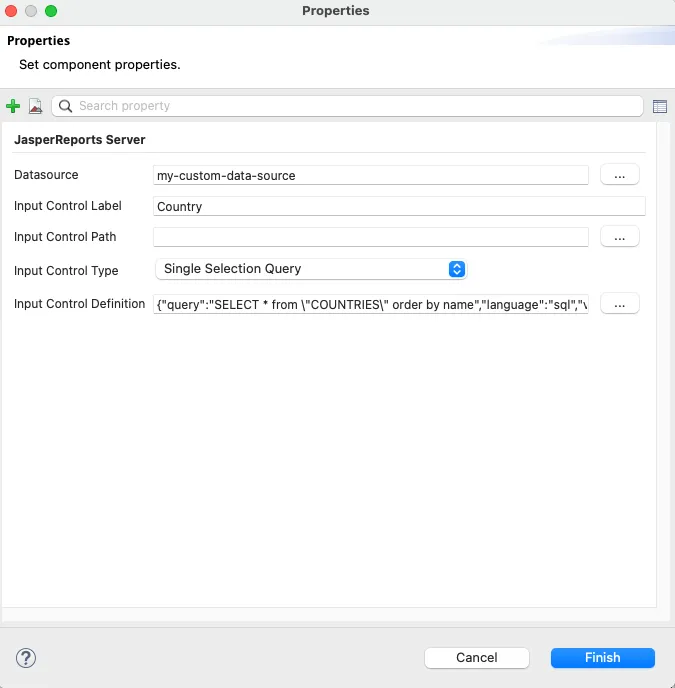
Most properties in that form are designed for JasperReports Server (as the title indicates). ReportShell uses these same properties (except the Input Control Path), plus a few custom ones, to build a structured control metadata object:
- Label: The display label (from the “Input Control Label” field in Studio).
- Data Type: A structured UI data type (described below) inferred from the parameter’s Java type.
- Is Multi-Valued: Indicates if the control accepts multiple values (derived from the control type and parameter’s Java type).
- Is Choice: Indicates if the control offers a finite set of options (e.g., dropdown, radio buttons).
- Is Required: Determined by the custom property
reportshell.ic.required(trueorfalse). - Is Read Only: Determined by the custom property
reportshell.ic.readOnly(trueorfalse). - Is Hidden: Indicates if the control is hidden. Hidden controls are not supposed to be displayed to the user. By default, an input control is hidden if it doesn’t have a label.
- Data Descriptor: Either a static list of values (LOV) or a query definition for choice control options with value field and label columns.
- Data Source: The data source to be used to execute the control query for loading the option list (“Data Source” field in Studio).
- Preferred Choice Widget: Preferred UI element type for choice controls, such as a Select, Radio or Checkbox group.
Data Types
Section titled “Data Types”Data Types are another concept borrowed from JasperReports Server. They represent simple, UI-friendly types for value formats and basic validation.
Currently, ReportShell does not apply backend validation based on data types. It only infers them from the underlying Java types and exposes them via REST APIs so the UI can choose the right form controls and apply client-side checks.
Supported data types are as follows:
| UI Type | Description | Example |
|---|---|---|
| String | Text input | "Hello World" |
| Boolean | Checkbox/Toggle | true/false |
| Integer | Whole numbers | 42 |
| Number | Decimals (BigDecimal) | 42.10 |
| Date | ISO-8601 Date | "2024-01-31" |
| DateTime | ISO-8601 Timestamp | "2024-03-01T15:30:00Z" |
Parameter serialization (HTTP)
Section titled “Parameter serialization (HTTP)”ReportShell binds input control values from HTTP requests using string-based conversion rules. This matters when you build your own frontend or call the REST APIs directly.
General rules
Section titled “General rules”-
All values are strings on the wire.
-
Multi-valued controls are sent by repeating the parameter name:
city=1&city=2 -
Missing vs explicit null:
-
If a parameter is missing from the request, it is treated as “not set / empty”.
-
If a parameter is explicitly set to null, send it via
rs.null(used for “Select All / No Filter” patterns):rs.null=country
-
Number / Decimal formatting
Section titled “Number / Decimal formatting”When sending numeric parameters (including decimals), use:
- Dot (
.) as the decimal separator. - No thousands separator.
Examples:
amount=42.10amount=-7.2323
Date formatting
Section titled “Date formatting”Dates use ISO-8601 date-only format:
YYYY-MM-DD(example:2024-01-31)
DateTime formatting and timezone behavior
Section titled “DateTime formatting and timezone behavior”Date-time parameters accept ISO-8601 timestamps with or without a timezone/offset.
- With timezone/offset (unambiguous):
2024-03-01T15:30:00Z2024-03-01T15:30:00+03:00
- Without timezone/offset (ambiguous):
2024-03-01T15:30:00
If a date-time value does not include timezone/offset information, ReportShell interprets it as a point in time using the server’s system/application timezone, similarly to Jackson’s java.sql.Timestamp deserialization behavior.
For example, if the report parameter type is LocalDateTime, ReportShell effectively parses the incoming string as a timestamp in the system/application timezone and then converts it to a LocalDateTime using that same timezone.
Cascading Controls
Section titled “Cascading Controls”Input controls can depend on one another. Parameters often reference other parameters in their queries (for example, a Cities query filtering by $P{Country}).
ReportShell automatically detects these dependencies. When a “parent” control changes (for example, when Country is selected), ReportShell tells the frontend which “child” controls (such as Cities) must be refreshed.
Automatic Re-evaluation
Section titled “Automatic Re-evaluation”When parameters change, the backend:
- Detects dependencies: Finds which query-based controls depend on the updated values.
- Re-evaluates dependents: Re-runs queries for dependent controls when the parent has a value, or clears their datasets when the parent is empty.
- Validates selection: Ensures the child control’s selected values are still present in the new dataset, and drops any invalid selections.
The “Select All” Behavior
Section titled “The “Select All” Behavior”“Select All” or “No Filter” is a common pattern in reports.
- Explicit null: ReportShell treats an explicit
nullvalue as “Select All” (“ignore this filter”). - Missing value: If a parameter is not present in the request at all, it is treated as “not set” or empty.
Report authors should write control queries to handle both cases (for example, WHERE country = $P{Country} OR $P{Country} IS NULL) or use $X{..} expressions. Following this contract ensures that the UI’s “Select All” option correctly returns unfiltered results.
Data Binding
Section titled “Data Binding”ReportShell automatically binds HTTP request parameters to input control parameters through a binding system similar to Spring’s DataBinder which returns a BindingResult.
Incoming values from the request are converted to the parameter’s Java type. For multi-valued controls, each element is converted separately and any errors are collected.
Type mismatches are reported as bind exceptions, just like in Spring MVC.
Control Values and Option Lists
Section titled “Control Values and Option Lists”ReportShell determines input control states (selected values and option lists) in a dependency-aware order. Controls are sorted by their dependencies and evaluated in the proper sequence.
On initial load, default values are determined via default value expressions or user defined hooks. On later requests, only controls whose dependencies have changed are re-evaluated.
If a control specifies a data source path, ReportShell resolves that specific data source. If not, it falls back to the default data source strategy based on the query language.
See Data Sources for more information.
Default Value Expressions
Section titled “Default Value Expressions”ReportShell supports evaluation of parameter default value expressions in your JRXML through use of JasperReports Library’s compiler manager.
This feature is disabled by default, since expression compilation may spawn external
processes in some environments. If you are running on a full JDK,
or you have jasperreports-jdt-xxx.jar on the classpath, you can enable
this feature by setting the Spring application property reportshell.expression-evaluation.enabled to true.
Only expressions with EARLY evaluation mode are evaluated.
Expressions must be static (for example, the current date) and must not depend on parameter values.
If your expressions use built-in functions, you also need jasperreports-functions-xxx.jar on the classpath.
Although unlikely in typical setups, it is a good idea to test your environment
for spawned external processes, or simply keep jasperreports-jdt-xxx.jar on the classpath
at all times to avoid relying on an external compiler.
This feature has been verified with simple expressions and a subset of the built-in JasperReports functions. It is not feasible to cover every possible scenario, so please reach out if you run into any issue.
Related Topics
Section titled “Related Topics”
© 2026 Bivektor Inc. All rights reserved. ReportShell™
is a trademark of Bivektor, Inc.
Questions? Email us at reportshell@bivektor.com.
JasperReports® and Jaspersoft® are trademarks of Cloud Software Group, Inc. and/or its subsidiaries. Eclipse BIRT™ and BIRT™ are trademarks of the Eclipse Foundation. Spring® is a trademark of Broadcom Inc. and/or its subsidiaries. React is a trademark of Meta Platforms, Inc. ReportShell and Bivektor, Inc. are not affiliated with, endorsed by, sponsored by or otherwise associated with the owners of the JasperReports®, Jaspersoft®, Spring®, Eclipse BIRT™, BIRT™ or React marks. Any reference to these or other trademarks on this site is made solely for informational, descriptive, comparative and interoperability purposes.